
Merx 2
More shop. Just as simple.
Merx 2 is the new major version of Merx, built for Kirby 5. Prices in any currency, tax rates per product and country, a JSON API that keeps your pages cacheable, and every Stripe payment method in one integration. It’s a toolset, not a framework — if you know Kirby, you know Merx.
Pricing rules
Every price in the right currency
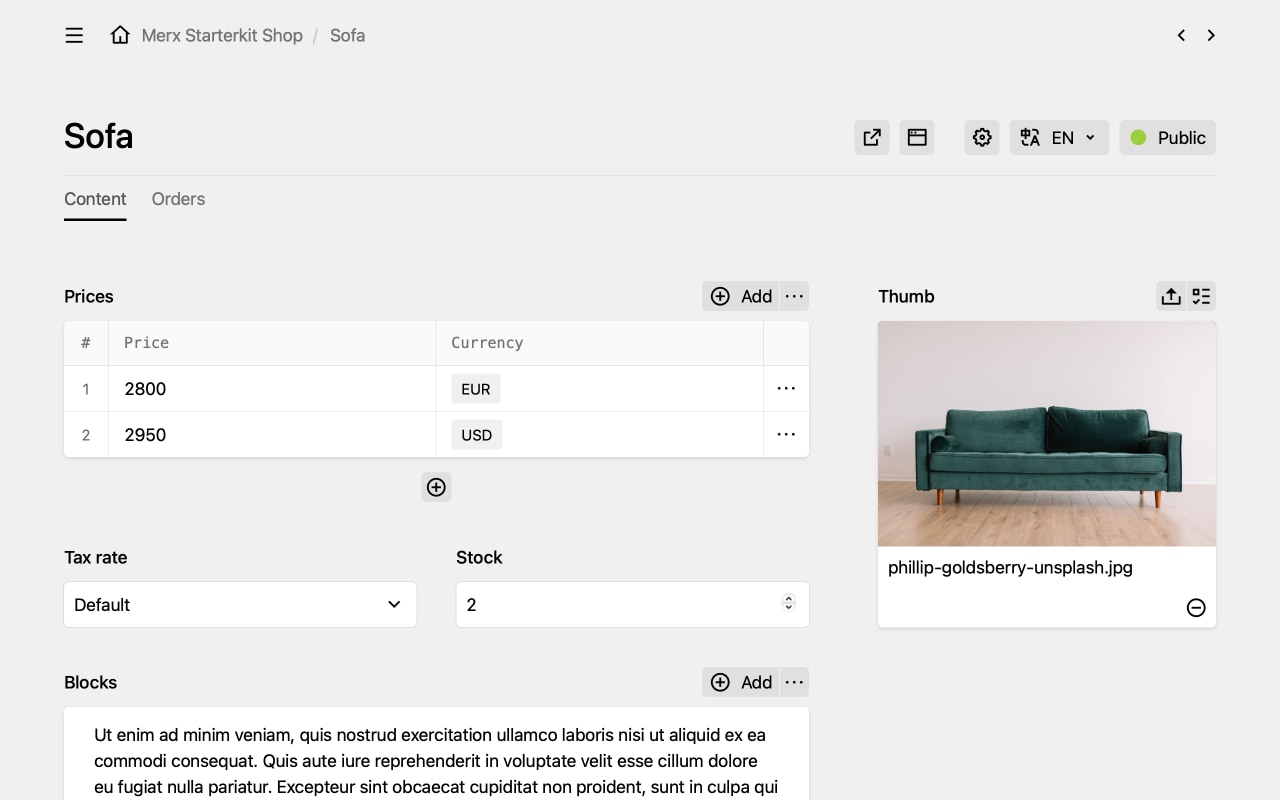
A pricing rule decides which price a visitor sees — by language, by domain, by date, or by anything else you can write in PHP. Each rule brings its own currency and says whether its prices include tax. In the Panel, editors enter one price per rule.
Tax rules
The right rate for every product
Every product names a tax rule, and the rule sets the rate: reduced for books, standard for everything else, different per country. A cart with several rates adds up each of them on its own, ready for the invoice.
<?php

return [
  'wagnerwagner.merx.taxRules' => [
    'default' => [
      'name' => 'Standard rate',
      'rate' => 0.19,
    ],
    'reduced' => [
      'name' => 'Reduced rate',
      'rate' => 0.07,
    ],
  ],
];
Shop API
Personal cart, cacheable pages
Your product pages look the same for every visitor; the cart doesn’t. Merx 2 serves cart and checkout from a small JSON API under /api/shop, so the rest of your site can stay static and sit behind a CDN. Errors come with a translation key, and responses can be trimmed to the fields you need. Rather render the cart in PHP? Every operation works there too.
await fetch('/api/shop/cart', {
  method: 'POST',
  headers: { 'Content-Type': 'application/json' },
  body: JSON.stringify({ page: 'products/shoes', quantity: 2 }),
});

// The cart badge in your header only needs the quantity
const response = await fetch('/api/shop/cart?view=compact');
const { data } = await response.json();

console.log(data.quantity); // 2
PHP API
A class for every part of the shop
Everything the JSON API does, PHP does too — with typed classes and a reference page for every method. Cart, ProductList, ListItems and ListItem hold what’s in the cart. Price and Tax know their net and gross amounts, PricingRule and TaxRule decide which ones apply, collected in PricingRules and TaxRules. ProductPage and OrderPage are the models your pages extend, PaymentDetails keeps the record of every payment, Logger writes the log, and Merx ties it all together.
<?php

$cart = cart();
$cart->add(['page' => 'products/socks', 'quantity' => 2]);

foreach ($cart as $item) {
  echo $item->title;         // Socks
  echo $item->price;         // €10.71
}

$total = $cart->total();
echo $total->priceNet;       // 18
echo $total->tax->rate();    // 19%
echo $total;                 // €21.42
Stripe Elements
One integration, every payment method
Cards, Apple Pay, Google Pay, SEPA Direct Debit, iDEAL, Klarna: Stripe Elements shows whichever methods you activate in your Stripe dashboard, matched to the customer’s currency and location. PayPal and invoice are built in, and any other provider is a custom gateway away.
In-app browsers
Payments that find their way back
A customer taps your link in Instagram, pays with PayPal and ends up in Safari. Merx 2 carries the checkout across browsers, so the order is completed wherever the customer lands.
Cart items
Shipping, discounts and more
Every line in the cart is a list item with a type: product, shipping, discount, promotion, credit or custom. Shipping costs and discounts sit in the cart next to the products and end up in the order the same way.
Volume-based pricing
Prices that know the quantity
A product’s price can depend on how many are in the cart. Override price() in your product model, and the cart passes the quantity for you.
<?php

use Wagnerwagner\Merx\Price;
use Wagnerwagner\Merx\PricingRule;

class ProductPage extends Wagnerwagner\Merx\ProductPage
{
  public function price(
    null|string|PricingRule $pricingRule = null,
    null|float $quantity = null,
  ): ?Price {
    $price = parent::price($pricingRule, $quantity);
    if ($quantity >= 10) {
      $price = $price->updatePrice($price->price * 0.95);
    }
    return $price;
  }
}
Stock
Never sell what you don’t have
Give a product a stock field and Merx does the counting. The cart refuses more than there is, the checkout checks again before the payment is captured, and every order lowers the stock — test orders excepted.
Hooks
A hook for every step
Before and after every cart operation, before and after an order is initialized and created, and when an order is paid — even if that happens days later, as with SEPA Direct Debit. Send mails or talk to your ERP without touching Merx.
<?php

return [
  'hooks' => [
    'wagnerwagner.merx.orderPaid' => function ($orderPage) {
      // Right away for a card, days later for SEPA Direct Debit
    },
  ],
];
Orders in the Panel
One click from order to payment
Orders arrive newest first, in a searchable table. Every order has a button that opens its transaction at Stripe or PayPal. Order numbers are stored with the order and never change — and if you need your own format, it’s one option.
Security
Safe by default
Merx 2 checks that a payment covers the order before it writes one, and ties every return from Stripe or PayPal to the checkout that started it. Order pages stay out of caches and search engines, every view is logged, and an order keeps just enough to find its transaction again — never the provider’s full response.
Documentation
Docs for you and your coding agent
The reference is generated from the source code, so it lists everything and never falls behind a release. Every page is also available as Markdown, and llms.txt hands coding agents exactly the pages they need.
And much more
- API responses in the visitor’s language, via the
X-Languageheader - Your own fields in every API response, with custom models
- Kirby 5.5 and PHP 8.2 to 8.5
Get started
Start with the guide, try the Starterkit, or buy a license. Upgrading from Merx 1? The upgrade guide walks you through every rename.